Charging profiles are only useful when teams understand scope, priority, and fallback behavior in production. The real deployment question is not only which profile to set, but which system is allowed to constrain power and how charger behavior is verified.
Charging profiles are a rollout control surface
TL;DR: OCPP charging profiles control how much power a charger delivers and when, using purpose enums (station max, connector/EVSE default, transaction override, and — in 2.0.1 — external station constraints), stack levels within each purpose, and time-bounded schedules. The effective limit is the combination of those rules; a charger accepting a profile does not guarantee it enforces it — so validate behavior on real hardware before rollout.
Most teams encounter charging profiles as a protocol feature. Deployers should treat them as a control surface that can either protect a site or destabilize it.
The useful question is not only:
Which charging profile purpose do we use?
It is:
Which system is allowed to set power limits, how do those limits interact, and how do we know the charger is actually enforcing them?
That is what determines whether smart charging works safely in production.
What are charging profiles?
Charging profiles are OCPP's mechanism for controlling how much power a charger delivers and when. They're the building blocks of smart charging — without them, every charger draws maximum power at all times.
A charging profile is essentially a schedule: "Between time A and time B, limit power to X kW." Each profile carries a purpose (its scope), a stack level (its priority), and a schedule made of time-bounded periods. The charger combines every applicable profile into a single effective limit at each moment.
In practice, teams that treat profiles as a configuration detail tend to discover their gaps the hard way: a site trips its main breaker, or a fleet vehicle leaves under-charged because a default profile silently won the resolution. The mental model that holds up in production is scope first, priority second, schedule third.
What are the OCPP charging profile purposes?
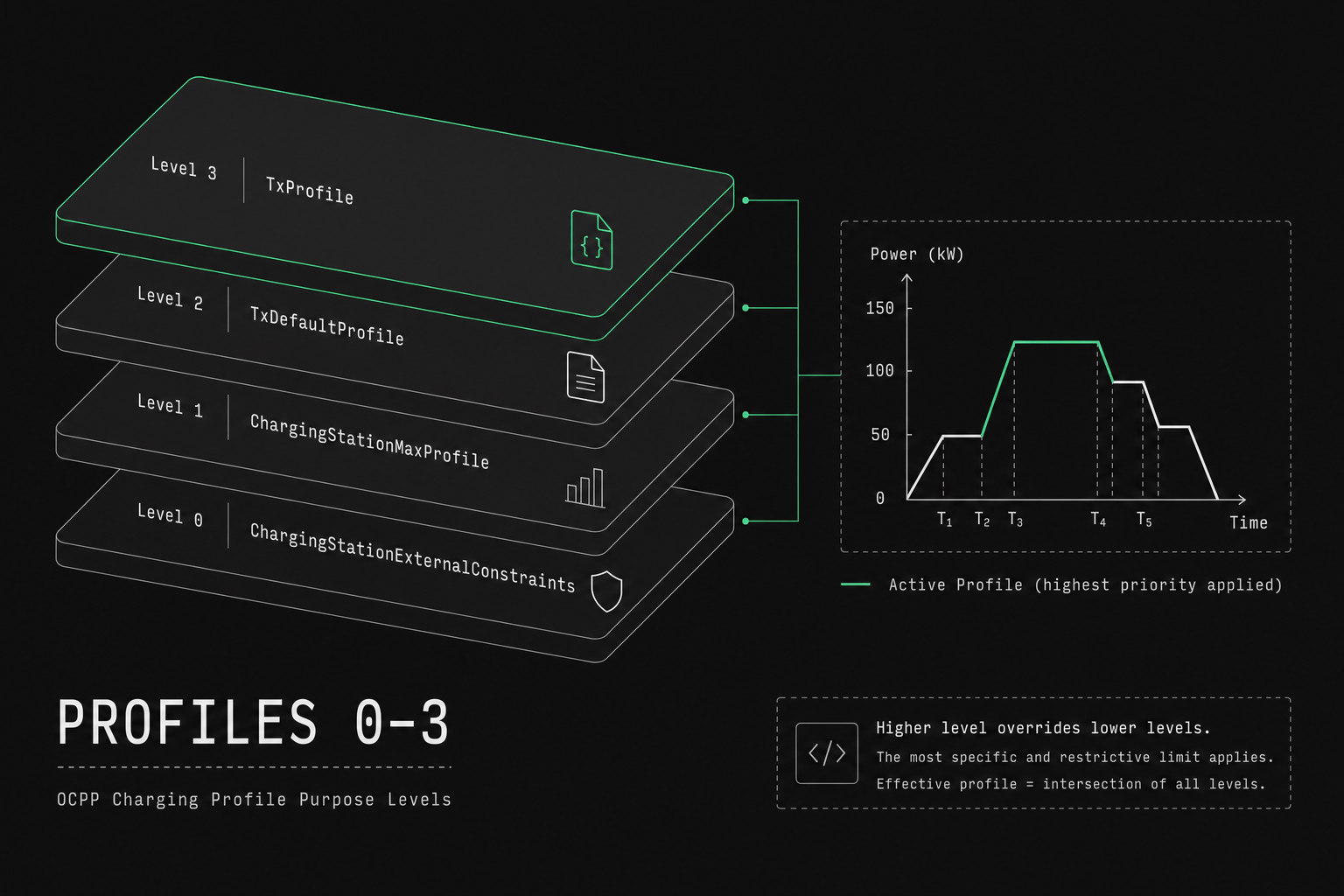
OCPP defines charging profiles by their purpose — a string enum on the wire, not integer codes 0–3. Older articles and some UIs number them for teaching; implementers should use the official names in SetChargingProfile.
OCPP 1.6 purposes:
ChargePointMaxProfile— station-wide ceiling (connectorId = 0)TxDefaultProfile— default for new transactions on a connectorTxProfile— one active transaction (requirestransactionId)
OCPP 2.0.1 renames the station max and adds a fourth purpose:
ChargingStationMaxProfile(was Charge Point max in 1.6 naming)TxDefaultProfileTxProfileChargingStationExternalConstraints— external / grid-side station limit
Picking the wrong purpose is the most common reason a correct-looking limit fails to take effect. Limits on the wire use amps or watts (chargingRateUnit: A or W); kW in examples below is for readability only.
The hierarchy below is the one to keep in your head. Outer scopes constrain inner ones: the station max bounds the site, and a connector default is overridden by a transaction profile for that session once the station ceiling is accounted for.
┌─────────────────────────────────────────────────────────────┐
│                   CHARGING STATION                           │
│                                                              │
│  ┌────────────────────────────────────────────────────────┐ │
│  │  ChargePointMaxProfile / ChargingStationMaxProfile     │ │
│  │  "The entire station cannot exceed 100 kW"             │ │
│  │                                                        │ │
│  │  ┌──────────────────┐  ┌──────────────────┐           │ │
│  │  │  Connector / EVSE│  │  Connector / EVSE│           │ │
│  │  │                  │  │                  │           │ │
│  │  │ TxDefaultProfile │  │ TxDefaultProfile │           │ │
│  │  │ "Default: 22 kW" │  │ "Default: 22 kW" │           │ │
│  │  │                  │  │                  │           │ │
│  │  │ ┌──────────────┐ │  │ ┌──────────────┐ │           │ │
│  │  │ │ TxProfile    │ │  │ │ TxProfile    │ │           │ │
│  │  │ │ "This session│ │  │ │ "This session│ │           │ │
│  │  │ │  gets 11 kW" │ │  │ │  gets 7 kW"  │ │           │ │
│  │  │ └──────────────┘ │  │ └──────────────┘ │           │ │
│  │  └──────────────────┘  └──────────────────┘           │ │
│  └────────────────────────────────────────────────────────┘ │
└─────────────────────────────────────────────────────────────┘
ChargePointMaxProfile / ChargingStationMaxProfile
Scope: The entire charging station.
This is the absolute ceiling. No matter how many connectors are active or what their individual profiles say, the total power draw of the station cannot exceed this limit. In OCPP 1.6 send it with connectorId = 0; in 2.0.1 use evseId = 0 with purpose ChargingStationMaxProfile.
When to use it:
- Your building has a fixed grid connection (e.g., 150 kW)
- You need a hard site cap while other systems still push session profiles
- Load shedding during peak hours (backend updates the station max)
Example: A parking garage has 200 kW available from the grid. Set the station max profile to 200 kW. Even if 10 outlets each try to draw 22 kW (220 kW total), the station firmware caps total draw at 200 kW.
TxDefaultProfile
Scope: A connector (OCPP 1.6 connectorId) or EVSE (OCPP 2.0.1 evseId).
This is the default profile applied to every new transaction on that outlet. If no transaction-specific TxProfile is set, this governs the session. This is how 1.6 already expresses per-outlet baselines — not only station-wide and per-transaction limits.
When to use it:
- Time-of-day scheduling: lower power during office hours, full power overnight
- Default limits based on connector type: 7 kW for AC, 50 kW for DC
- Seasonal adjustments: different defaults in summer vs winter
Example:
TxDefaultProfile for connector / EVSE 1:
┌──────────────────────────────────────────────────────┐
│                                                      │
│  22 kW ─── ┐                              ┌─── 22 kW│
│            │                              │          │
│  11 kW ─── │──────────────────────────────│          │
│            │     Office hours             │          │
│   7 kW ─── │      (09:00 - 18:00)        │          │
│            │                              │          │
│            │                              │          │
│  ──────────┼──────┬──────┬──────┬────────┼──────── │
│          00:00  06:00  09:00  18:00    00:00        │
│                                                      │
│  Night: 22 kW  │ Morning: 11 kW │ Day: 7 kW │ Eve  │
└──────────────────────────────────────────────────────┘
TxProfile
Scope: A specific, active transaction.
This overrides the TxDefaultProfile for one particular charging session. It's the most granular level of control. In OCPP 1.6 the Central System must include transactionId when the profile applies to a specific transaction; you cannot install a TxProfile without an active transaction (except as part of RemoteStartTransaction).
When to use it:
- Fleet priority: "This delivery van must be at 80% by 6 AM — give it maximum power"
- User tiers: premium users get higher power, free tier gets limited
- Dynamic optimization: adjust based on real-time grid prices or solar production
Example: A fleet vehicle plugs in at 22:00 and needs to depart at 05:00. The TxDefaultProfile says 7 kW (office hour remnant), but you set a TxProfile for this specific transaction:
TxProfile for Transaction #4521:
  22:00 - 02:00 → 22 kW  (charge fast while grid is cheap)
  02:00 - 04:00 → 11 kW  (grid price increases)
  04:00 - 05:00 → 22 kW  (final boost before departure)
ChargingStationExternalConstraints (OCPP 2.0.1 only)
In OCPP 2.0.1, the fourth purpose is ChargingStationExternalConstraints: an overall limit on the Charging Station that represents external constraints (grid operator, EMS, DSO), separate from the operator's own ChargingStationMaxProfile.
It is not "ChargePointMaxProfile at EVSE level." Per-EVSE baselines still use TxDefaultProfile with the right evseId; the station-wide operator cap remains ChargingStationMaxProfile.
How do stack levels resolve profile conflicts?
When several profiles of the same purpose apply, the highest stackLevel wins for that purpose. Stack levels do not rank a TxProfile against a station max; purpose still defines scope.
Higher stack level = higher priority within that purpose.
  Within TxProfile only:
  Stack Level 3:  fleet override     → 22 kW   ← wins among TxProfiles
  Stack Level 2:  dynamic pricing    → 15 kW

  Within TxDefaultProfile only:
  Stack Level 1:  office schedule    → 11 kW   ← wins among defaults if no TxProfile
  Stack Level 0:  base default       → 7 kW

  Then combine purposes for the session:
  Session target = TxProfile (if present) else TxDefaultProfile
  Station ceiling = ChargePointMaxProfile / ChargingStationMaxProfile
  (+ ExternalConstraints on 2.0.1 when present)

  Example: TxProfile 22 kW, station max 50 kW, two sessions at 22 kW → 44 kW total OK
A simplified session limit (ignoring external constraints and remaining capacity allocation):
  session_limit = MIN(
    station_max_remaining,
    tx_profile_limit  OR  tx_default_limit   // TxProfile replaces default for that tx
  )
SetChargingProfile status Accepted means the Charge Point processed the message — the specification explicitly notes that does not guarantee the schedule is followed to the letter when other constraints apply.
How do profiles stack in a real scenario?
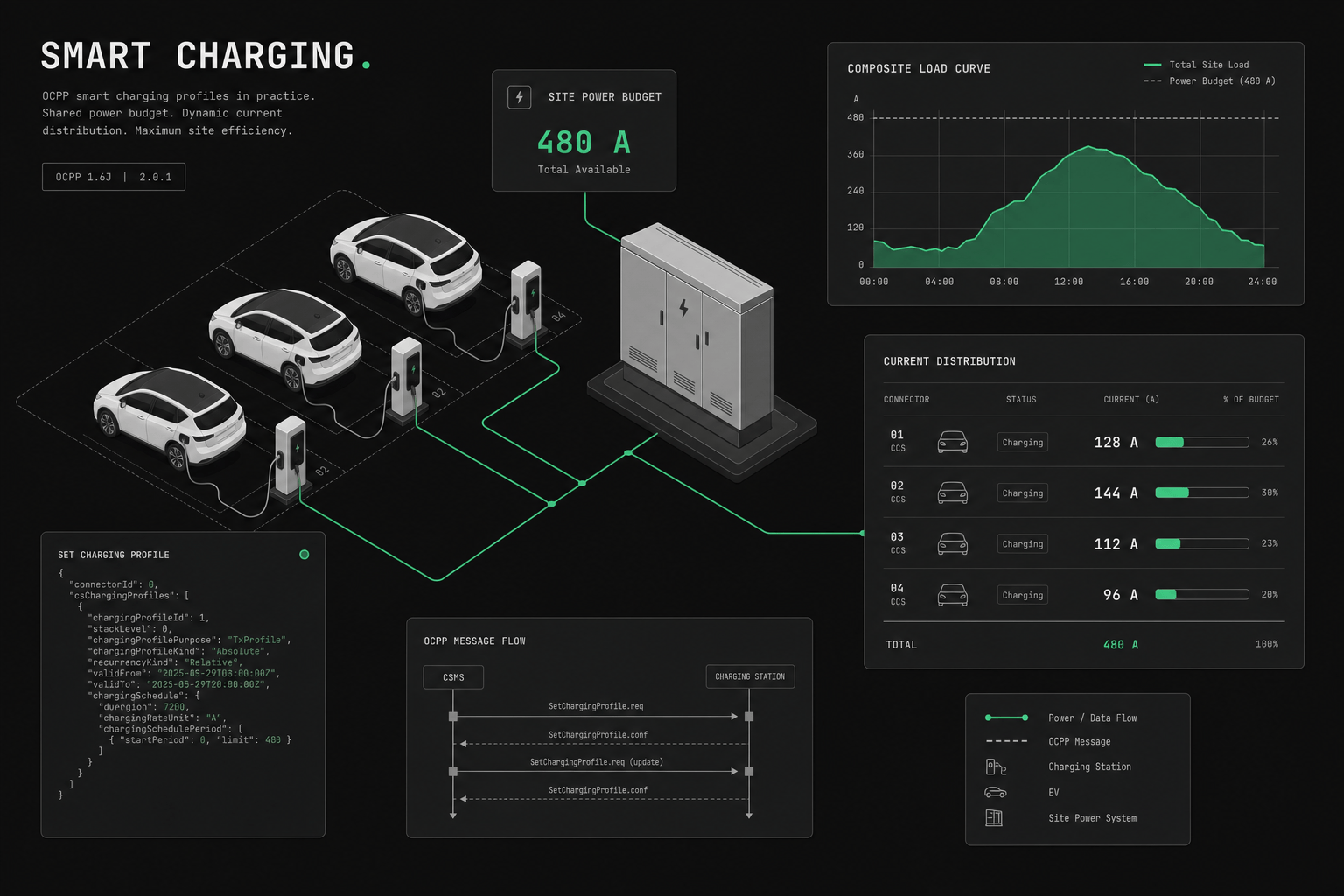
Profiles stack by applying the most constraining limit across every active purpose simultaneously: the station ceiling bounds the sum of all EVSEs, while each session resolves its own TxDefault and TxProfile limits. Here's a real-world scenario with all profile types active:
  Station: 100 kW grid connection
  EVSE 1: Session A (fleet van, priority)
  EVSE 2: Session B (employee car, standard)
  EVSE 3: Empty

  ┌─────────────────────────────────────────────┐
  │ ChargePointMaxProfile: 100 kW               │
  │                                             │
  │  EVSE 1 (Session A)         EVSE 2 (Sess B)│
  │  ┌───────────────────┐     ┌──────────────┐│
  │  │ TxDefault: 22 kW  │     │ TxDefault:   ││
  │  │ TxProfile: 50 kW  │     │ 22 kW        ││
  │  │ (fleet override)  │     │ (no override) ││
  │  │                   │     │              ││
  │  │ Effective: 50 kW  │     │ Effective:   ││
  │  │                   │     │ 22 kW        ││
  │  └───────────────────┘     └──────────────┘│
  │                                             │
  │  Total: 50 + 22 = 72 kW                    │
  │  Under 100 kW limit ✓                      │
  └─────────────────────────────────────────────┘
If Session B tried to draw 60 kW (e.g., DC fast charging), the station would cap it at 50 kW (100 kW station max minus 50 kW already allocated to Session A).
How do profile scheduling periods work?
A charging schedule defines power limits over time as a sequence of periods, each taking effect at a fixed offset from the schedule start. Each profile contains a charging schedule made of periods. Each period specifies:
- Start period — seconds from the schedule start
- Limit — power limit in watts (or amps, depending on unit)
- Number of phases — for AC: 1 or 3 phases
  Profile: "Night Optimization"
  Schedule start: 2026-03-12T18:00:00Z
  Duration: 43200 seconds (12 hours)
  Unit: Watts

  Periods:
  ┌─────────┬──────────────────┬──────────┐
  │ Start   │ Time             │ Limit    │
  ├─────────┼──────────────────┼──────────┤
  │ 0 sec   │ 18:00            │ 7,400 W  │
  │ 7200    │ 20:00            │ 11,000 W │
  │ 14400   │ 22:00            │ 22,000 W │
  │ 36000   │ 04:00            │ 11,000 W │
  └─────────┴──────────────────┴──────────┘
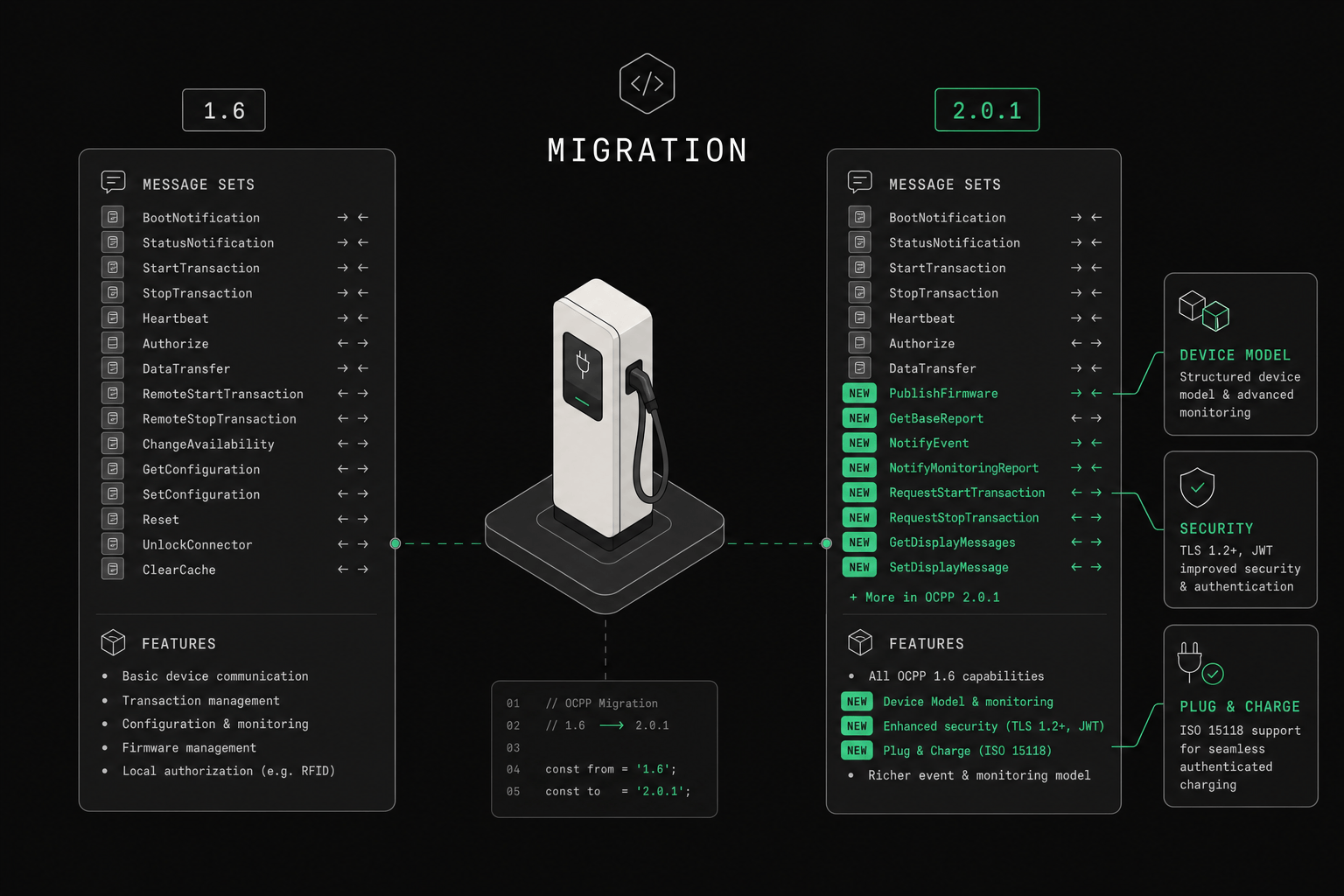
What changed between OCPP 1.6 and 2.0.1 charging profiles?
The core three-purpose model is the same. OCPP 2.0.1 renames the station max, adds ChargingStationExternalConstraints, enriches reporting, and adds vehicle-needs paths. If you run OCPP 1.6 and 2.0.1 chargers side by side, normalize purpose names in your gateway and do not invent an "EVSE max purpose" for 1.6 — use TxDefaultProfile per connector instead.
| Feature | OCPP 1.6 | OCPP 2.0.1 |
|---|---|---|
| Station max purpose | ChargePointMaxProfile | ChargingStationMaxProfile |
| Default / transaction purposes | TxDefaultProfile, TxProfile | Same names |
| External station constraints | No first-class purpose | ChargingStationExternalConstraints |
| Per-outlet default | Yes (TxDefaultProfile + connectorId) | Yes (TxDefaultProfile + evseId) |
| Unit | Amps or Watts | Amps or Watts |
| Recurrency | Daily, Weekly | Daily, Weekly |
| Cost / vehicle needs | Backend-driven profile updates | First-class cost + EV needs / schedule messages |
| Profile reporting | GetCompositeSchedule | GetCompositeSchedule + GetChargingProfiles / ReportChargingProfiles |
What are the most common charging profile mistakes?
The most common charging profile mistakes are scope, recurrence, and verification errors — not protocol bugs. Most profile failures we see in the field are not protocol bugs; they are scope, recurrence, or verification mistakes. The charger accepts the message and reports success, yet the power behavior on site differs from what the operator intended. The four patterns below account for the bulk of them.
Setting profiles on the wrong EVSE. In OCPP 1.6, connectorId=0 means the entire station, and connectorId=1 means the first connector. Mixing these up applies profiles at the wrong scope.
Forgetting about recurrence. A daily recurring profile repeats every 24 hours from the start time. If you set a non-recurring profile, it expires after its duration.
Not using GetCompositeSchedule. After setting multiple profiles, use GetCompositeSchedule to see what the charger will actually do. The composite schedule shows the effective power limit at each point in time, accounting for all stacked profiles.
Exceeding stack level limits. Some chargers only support a limited number of stack levels or profiles per EVSE. Check your charger's capabilities.
What should you test before a production rollout?
Before relying on charging profiles in production, test site cap enforcement, scope correctness, stack resolution, schedule boundaries, charger variance, and fallback behavior. Accepting an OCPP SetChargingProfile message is not proof the charger enforces it. Before relying on profiles in a live deployment, verify actual power behavior on the hardware you will ship, across the conditions that matter. In mixed-vendor rollouts the gap between "accepted" and "enforced" is usually where incidents come from. Validate:
- Site cap enforcement Confirm that aggregate station power respects the upstream limit under simultaneous sessions.
- Scope correctness Verify that station-wide, EVSE-default, and transaction-specific profiles are applied where you expect.
- Stack resolution Test overlapping profiles so you know which effective limit wins in practice.
- Boundary behavior Validate schedule transitions, recurrence windows, and overnight changes.
- Charger variance Compare the same profile logic across charger vendors and firmware versions.
- Fallback behavior Check what happens when connectivity to the CSMS or energy-management source is interrupted.
If you cannot pass those tests, your charging-profile strategy is not deployment-ready yet.
Frequently asked questions
What is the most common charging profile mistake?
The most common mistake is applying the right profile at the wrong scope, or assuming an accepted OCPP message guarantees correct enforcement. Teams need to verify actual power behavior on real chargers, not just confirm that SetChargingProfile returned success.
Why do stack levels matter?
Stack levels matter because multiple profiles of the same purpose can apply to one session at once. If teams do not understand which profile wins, they can create unstable or misleading charging behavior in production. Within a purpose, the highest stack level takes priority.
What should operators test before rollout?
Operators should test site caps, per-EVSE defaults, transaction overrides, schedule boundaries, charger-specific behavior, and fallback logic when backend connectivity is degraded. Each of these is a place where "accepted" and "enforced" can diverge across vendors and firmware.
How ev-cloud manages charging profiles
ev-cloud provides a visual profile management system:
- Drag-and-drop schedule editor — create time-based profiles visually
- Profile stacking preview — see how multiple profiles combine before applying
- Fleet rules engine — automatically assign TxProfiles based on user group, vehicle type, or departure time
- Real-time monitoring — see active profiles and actual power draw per session
- API-driven profiles — integrate with building energy management, solar inverters, or grid signals
Next step for rollout teams
If charging profiles are part of your rollout plan, continue with:
- Smart charging with OCPP for site-level control and acceptance-test guidance.
- OCPP platform buyer guide if profile control quality matters in procurement.
- Talk to ev-cloud if your team needs help validating profile behavior across mixed fleets.
Learn more about OCPP in our ultimate guide to OCPP.