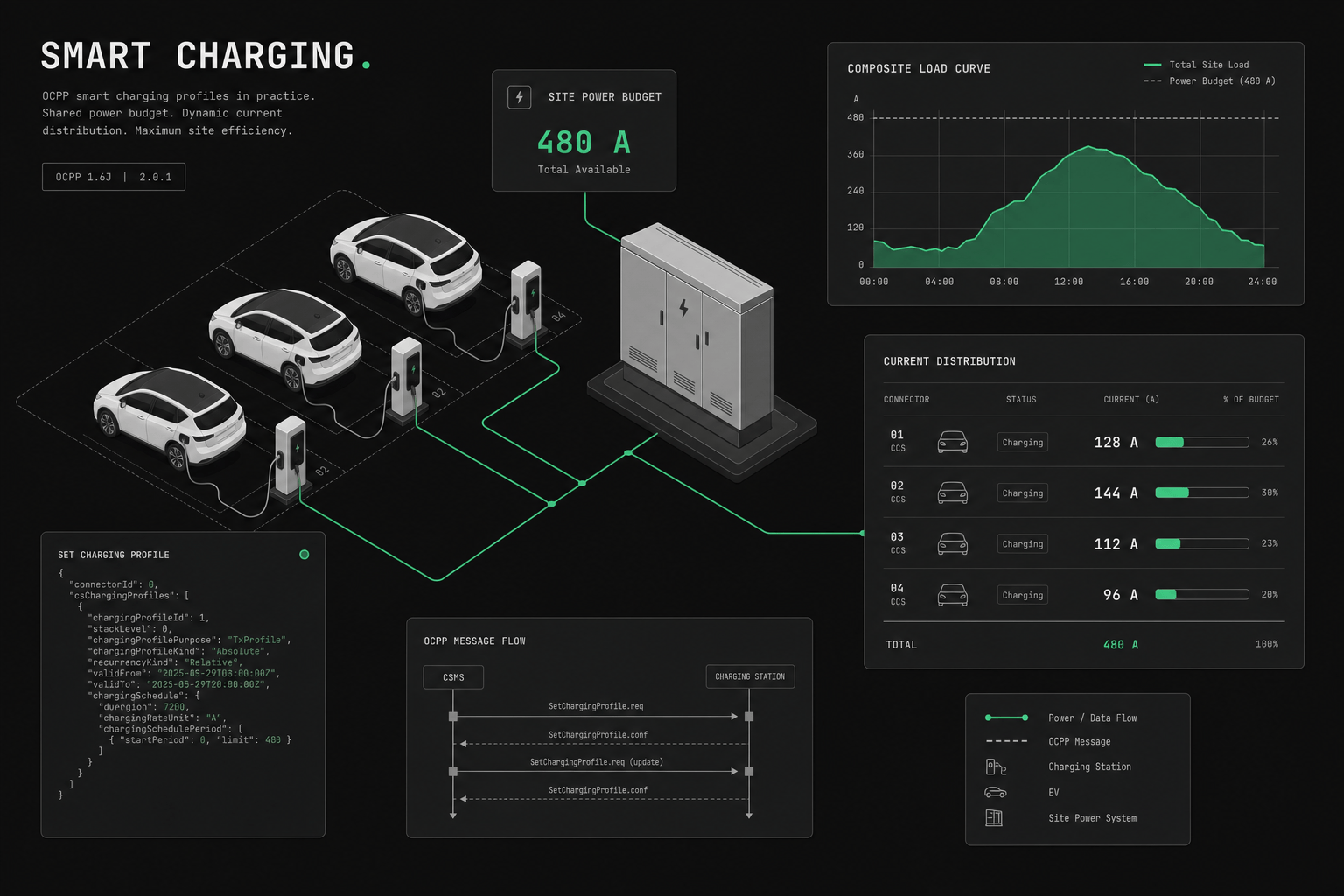
Smart charging only works in production when the profile model, site constraints, charger behavior, and fallback logic are aligned. The OCPP profile types are necessary, but they are only part of the deployment design.
Smart charging is a deployment decision, not only a protocol feature
Smart charging is the software control of how much power each EV charger draws, so a site stays within its electrical limits while still meeting driver and fleet needs. It succeeds or fails on deployment design, not on the protocol alone. The OCPP profile model gives you the levers, but where the site cap lives, how conflicts resolve, and what happens when a charger misbehaves are decisions you make, not features you switch on. Start with a more practical question:
What system is allowed to decide site power, and what happens when charger behavior does not match the plan?
That drives the real deployment work:
- whether the site cap lives in the charger, the backend, or an external EMS
- how priorities are resolved when sessions compete
- what telemetry delay you can tolerate
- what fallback applies when communications fail
- how much variance different charger vendors introduce
If those rules are unclear, smart charging projects become hard to debug and even harder to trust commercially.
Why does smart charging matter?
Smart charging matters because most sites cannot physically run every charger at full power at once. It dynamically distributes the available capacity across active sessions so the site stays inside its grid connection while still delivering energy where it is needed most.
The arithmetic is unforgiving. A single DC fast charger can draw in the 150-350 kW band, depending on hardware and vehicle. A parking garage with 20 AC chargers rated at 22 kW each would need roughly 440 kW if all ran flat out. Those are nameplate ratings, not measured loads, but they illustrate the problem: most commercial buildings have nowhere near enough spare electrical capacity to support every connector at full power simultaneously.
In practice, the choice is between paying for an expensive grid upgrade or controlling power in software. Smart charging is how you take the second path without tripping the main breaker or blowing your demand charges.
What are the OCPP charging profile types?
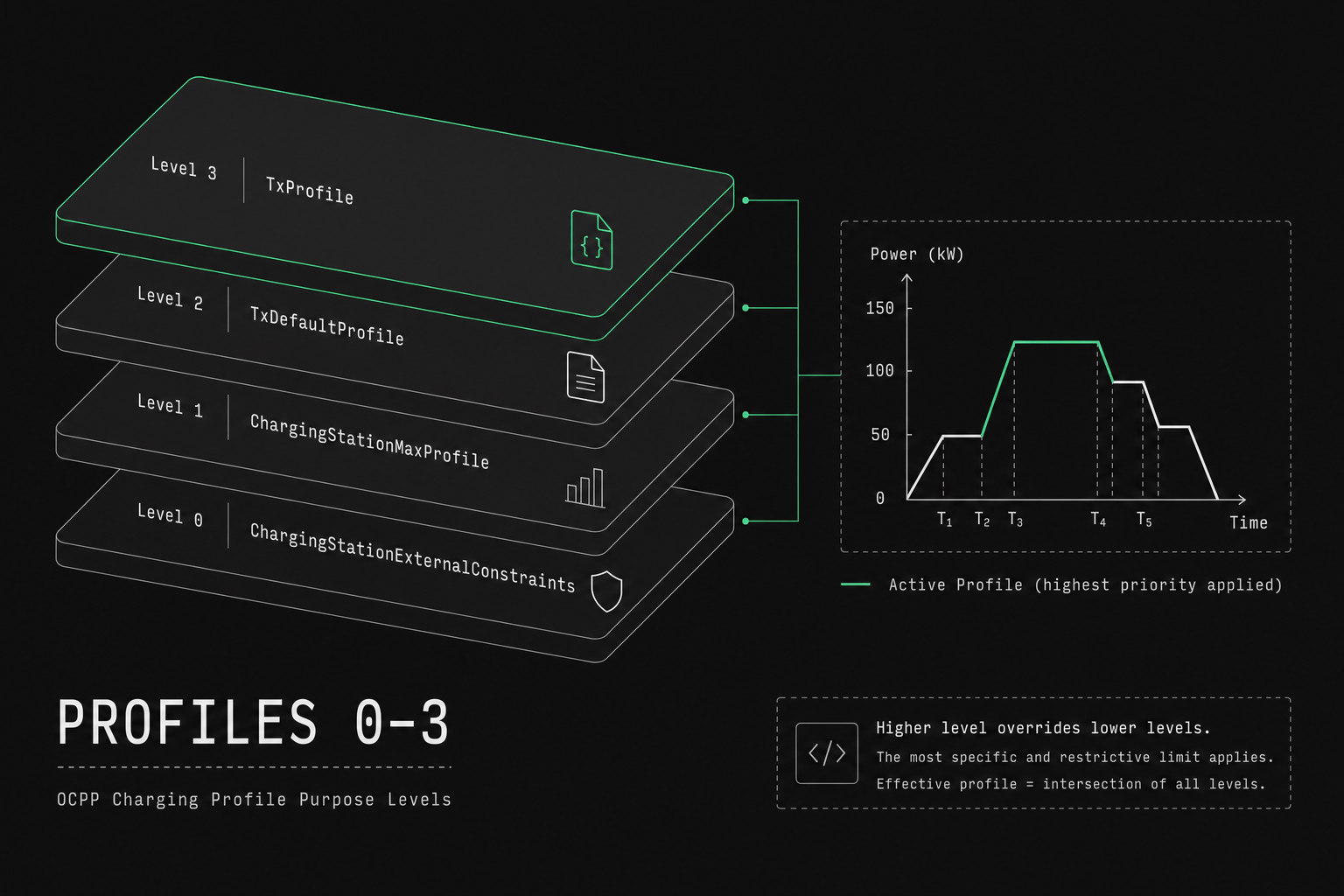
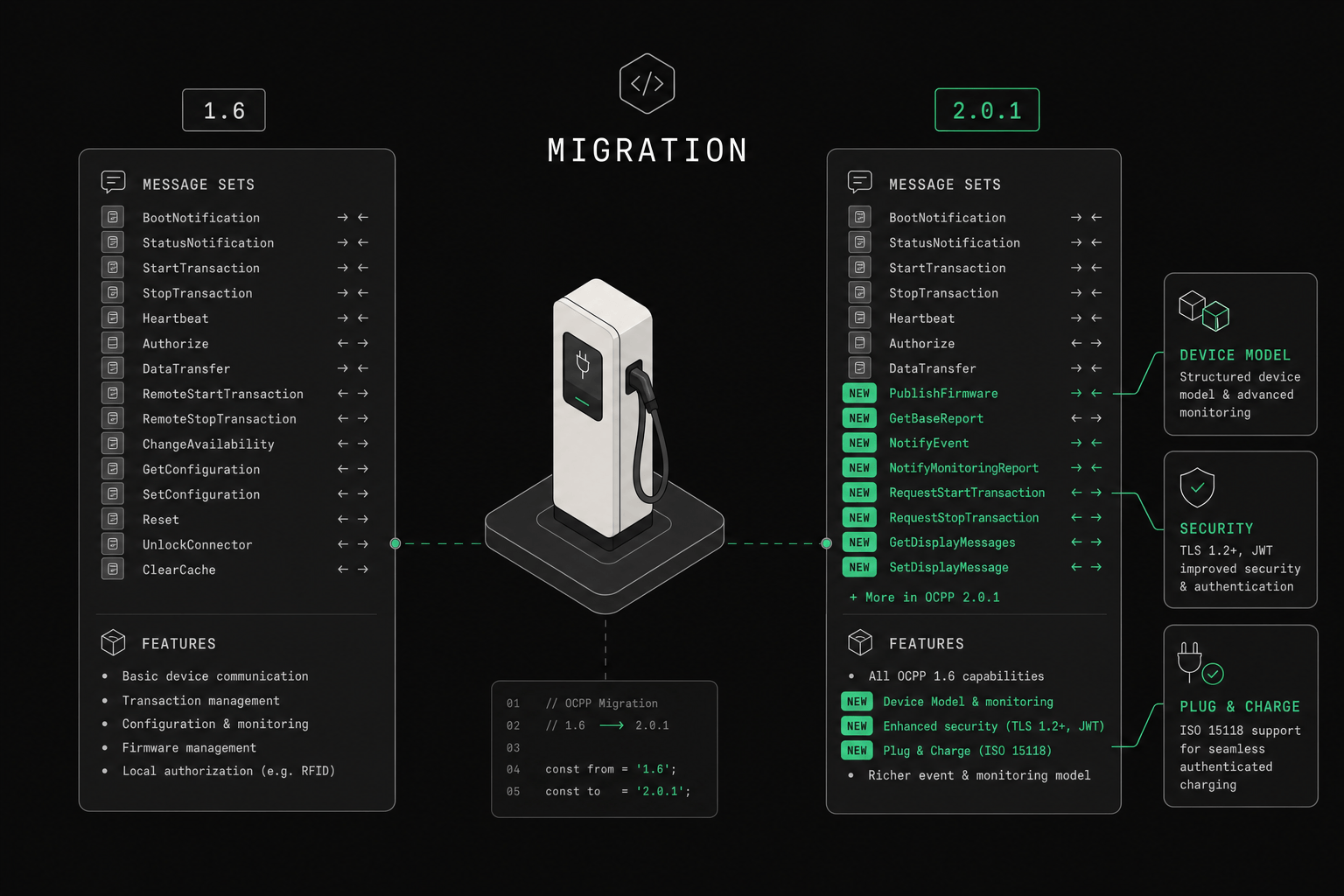
The OCPP specification defines charging profile purposes as string enums. OCPP 1.6 has three: ChargePointMaxProfile (station), TxDefaultProfile (per-connector default), and TxProfile (active session). OCPP 2.0.1 renames the station max to ChargingStationMaxProfile and adds ChargingStationExternalConstraints for grid/EMS limits. They layer, with the station cap as the hard ceiling and transaction profiles shaping individual sessions beneath it. Examples below use kW for readability; on the wire the rate unit is amps or watts.
The distinction matters operationally because each profile answers a different question. The station max protects the upstream electrical constraint, the default profile sets baseline behavior for every new plug-in, and the transaction profile lets you react to a specific car or driver. Mixing those concerns into one profile is a common source of confusion when you later try to debug why a session got the power it did.
Station max (ChargePointMaxProfile / ChargingStationMaxProfile)
Sets the maximum power for the entire charging station. Think of it as the "circuit breaker" — no combination of sessions can exceed this limit. Use connectorId = 0 in 1.6; evseId = 0 with ChargingStationMaxProfile in 2.0.1.
Use case: Your building has a 200 kW grid connection. Set the station max to 200 kW. The station firmware ensures total power draw never exceeds this.
TxDefaultProfile
The default charging profile applied to all new transactions on a specific connector (1.6) or EVSE (2.0.1). If no transaction-specific profile is set, this is what applies.
Use case: Set a default 7 kW limit on all connectors during business hours (09:00-18:00) to ensure building loads aren't affected. Outside business hours, set it to 22 kW.
TxProfile
A profile applied to a specific, active transaction. Overrides the TxDefaultProfile for that session only. In 1.6 it must carry transactionId when applied to an ongoing session.
Use case: A fleet vehicle needs to be fully charged by 6 AM. Set a TxProfile that prioritizes this session with higher power allocation.
Comparing the core profile purposes
The table below summarizes how the three core purposes differ in scope, lifetime, and the operational role each one plays on a live site. OCPP 2.0.1 additionally supports ChargingStationExternalConstraints for external station limits — see the profile purposes breakdown.
| Profile purpose | Scope | Typical lifetime | Operational role |
|---|---|---|---|
ChargePointMaxProfile (1.6) / ChargingStationMaxProfile (2.0.1) | Entire charging station | Long-lived, rarely changed | Hard cap protecting the grid connection |
TxDefaultProfile | A specific connector / EVSE | Persists across transactions | Baseline limit and schedule for new sessions |
TxProfile | One active transaction | Ends with the session | Per-session override for priority or deadlines |
The effective limit a session sees is bounded by the station max and the winning session purpose (TxProfile if set, otherwise TxDefaultProfile), so the station max can never be exceeded no matter what a transaction profile requests.
How profile scheduling works
Profile scheduling lets a single profile carry a sequence of time-based periods rather than one flat limit. Each period defines its own power ceiling and start time, so one profile can ramp limits up and down across a day without any further messages from the backend.
Charging profiles aren't just static limits, they're schedules that can repeat daily or weekly. That is how you encode tariff windows and building occupancy without a backend constantly pushing new commands.
Profile: "Office Hours Load Management"
Stack Level: 1
Purpose: TxDefaultProfile

Schedule:
  Period 1: 09:00 - 12:00 → 7.4 kW limit
  Period 2: 12:00 - 14:00 → 11 kW limit (lunch = less building load)
  Period 3: 14:00 - 18:00 → 7.4 kW limit
  Period 4: 18:00 - 09:00 → 22 kW limit (building empty)
How stack levels resolve profile conflicts
Stack levels resolve conflicts by ranking profiles of the same purpose: when more than one profile of that purpose applies, the charger uses the highest stack level. This lets you push a temporary override on top of a standing default of the same purpose without deleting the default underneath it.
A TxProfile is not "higher stack level" than a TxDefaultProfile — it is a different purpose that applies to the active transaction. Station max is a separate purpose that still caps the site.
Think of purposes as layers, and stack levels as priority within a layer:
- Station max (
ChargePointMaxProfile/ChargingStationMaxProfile) — absolute site ceiling TxProfile— transaction-specific override when presentTxDefaultProfile— default for the connector / EVSE when no TxProfile applies
The effective limit is the minimum of the station ceiling and the session purpose in force. If the station max is 100 kW and the transaction profile says 50 kW, the session gets 50 kW.
Which load management strategy should you use?
The right strategy depends on how predictable your sessions are and how much you need to prioritize between them. Static limits suit fixed, well-known constraints; dynamic optimization suits sites with solar, variable tariffs, or fleet deadlines. Most production sites end up combining a static site cap with a dynamic allocation layer underneath it.
In mixed-fleet rollouts, we have seen the failure usually show up as one strategy quietly starving another: an equal-distribution layer keeps shaving power from a vehicle that a priority rule was supposed to protect. Decide the precedence between your strategies before you deploy, not after a driver complains they left with a half-charged van.
Static load management
Set fixed limits based on known constraints. Simple but inflexible.
Example: 10 EVSEs, 100 kW grid connection. Set the station max profile to 100 kW. Each EVSE gets a TxDefaultProfile of 10 kW.
Equal distribution
Divide available power equally among active sessions. As sessions start and end, recalculate.
Example: 100 kW available. 2 active sessions = 50 kW each. Third car plugs in = 33 kW each.
First-come, first-served
Early sessions get maximum power. Later sessions get whatever remains.
Example: 100 kW available. First car gets 50 kW. Second car gets 50 kW. Third car gets 0 kW (queued until capacity frees up).
Priority-based
Assign priorities based on user type, departure time, or business rules.
Example: Fleet vehicles (priority 1) get 22 kW. Employee vehicles (priority 2) get 11 kW. Visitor vehicles (priority 3) get 7 kW.
Dynamic optimization
Integrate with real-time signals: building energy management, solar production, grid tariffs, vehicle battery state.
Example: Solar panels producing 30 kW surplus → increase charging limits. Grid price spikes → reduce to minimum. Fleet vehicle leaving in 1 hour → boost to maximum.
What does OCPP 2.0.1 add for smart charging?
OCPP 2.0.1 closes the feedback gap that 1.6 left open. In 1.6 the backend largely guesses what a vehicle needs; 2.0.1 lets the charger report actual energy needs and departure times, query active profiles, and optimize locally against energy prices. That turns smart charging from an open-loop command into a closed loop with real signals.
OCPP 2.0.1 adds several smart charging capabilities over 1.6 (the full message set is published on the Open Charge Alliance downloads page):
- NotifyEVChargingNeeds — the charger reports what the vehicle actually needs (energy, departure time), enabling optimal scheduling
- ClearedChargingLimit — signals when an external constraint is lifted
- ReportChargingProfiles — query active profiles from the charger
- Cost-based optimization — communicate energy prices so the charger can optimize locally
What should you test before going to production?
Test real power outcomes, not just whether the charger accepted the profile message. A charger replying Accepted to a SetChargingProfile only confirms it parsed the request; it says nothing about whether the hardware will actually hold that limit under load, after a reboot, or when the backend drops. Every painful smart charging incident I have worked through traced back to that gap between acknowledgement and enforcement.
Before launch, test more than "profile accepted":
- Site cap enforcement Validate that total station draw respects the upstream limit during simultaneous sessions.
- Priority behavior Confirm that high-priority sessions actually receive the intended allocation under contention.
- Fallback mode Disconnect the backend or degrade connectivity and verify what limits remain enforced locally.
- Mixed hardware behavior Compare identical profiles across charger vendors and firmware versions to expose interpretation differences.
- Schedule transitions Test hour changes, tariff windows, and overnight schedules so the profile logic behaves correctly at boundaries.
- Telemetry reconciliation Compare commanded limits to actual power draw and meter values so operations can see whether the control loop is working.
If you do not have those six tests, you do not yet have a production-grade smart charging rollout.
What should you ask vendors before buying?
Push the evaluation past glossy feature lists and into failure behavior. The questions below surface where the authoritative limit lives, how conflicts get debugged, and what happens when a policy goes wrong on a live site. In our experience, vendors who answer these crisply tend to have actually run smart charging in the field, and those who deflect usually have not.
Ask vendors and internal teams:
- Where does the authoritative site limit live?
- What happens when a charger accepts a profile but does not enforce it accurately?
- How are conflicting profiles debugged in production?
- Which parts of the logic run locally on the charger versus centrally in the backend?
- How do you handle mixed 1.6 and 2.0.1 fleets in one energy policy?
- What is the rollback plan if a smart charging policy destabilizes a live site?
How does ev-cloud handle smart charging?
ev-cloud provides a smart charging engine that integrates with your OCPP chargers and feeds session data into OCPI where roaming applies:
- Visual profile editor — create and schedule charging profiles from the dashboard
- Automatic load balancing — equal distribution with configurable priorities
- API-driven — set profiles programmatically based on external signals (building EMS, solar inverters, grid APIs)
- Real-time monitoring — see active profiles and actual power draw per session
- Both OCPP versions — works with 1.6 SetChargingProfile and 2.0.1's enhanced model
Next step for rollout teams
If smart charging is part of your deployment plan, continue with the OCPP 2.0.1 protocol breakdown for the version differences that affect profile enforcement, and the OCPP platform buyer guide if profile control quality matters in vendor selection. When you are ready to shape site-cap logic, fallback rules, or a mixed-fleet rollout, talk to our team.